Key takeaways:
- A headless CMS separates content management from presentation, delivering structured content via APIs to any channel or device.
- Headless architecture enables true omnichannel publishing across web, mobile, apps, kiosks and emerging platforms.
- Greater flexibility and scalability come at the cost of increased developer reliance and upfront implementation effort.
- Traditional CMS platforms are faster to launch and better suited for simple, website-first projects.
- Decoupled CMS offers flexibility with a defined front end, blending elements of traditional and headless models.
- Hybrid headless CMS combines API-first delivery with visual editing tools to reduce editorial friction.
- The right architecture depends on organizational goals, technical resources and long-term digital strategy.
Choose headless CMS if: you manage 3+ channels (web, mobile, kiosks, voice), your front-end team is developer-led and you need content reuse at scale. Don’t choose headless CMS if: you’re a small team with one website, your editorial team needs WYSIWYG previews or you lack front-end engineering resources. Consider hybrid headless if: you want API-first delivery but your editors need visual authoring tools.
A headless content management system (CMS) is often described as the future of content management — and in many cases, that’s true. But it isn’t automatically the right choice for every organization.
For digital teams managing multiple websites, apps and emerging channels, a headless CMS can offer the flexibility and scalability that traditional platforms struggle to match. At the same time, headless architecture can introduce new complexity, especially for teams that rely on visual page building and editorial preview tools.
This guide breaks down the pros and cons of a headless CMS, explains how it compares to traditional platforms and helps you decide whether headless is the right approach for your business.
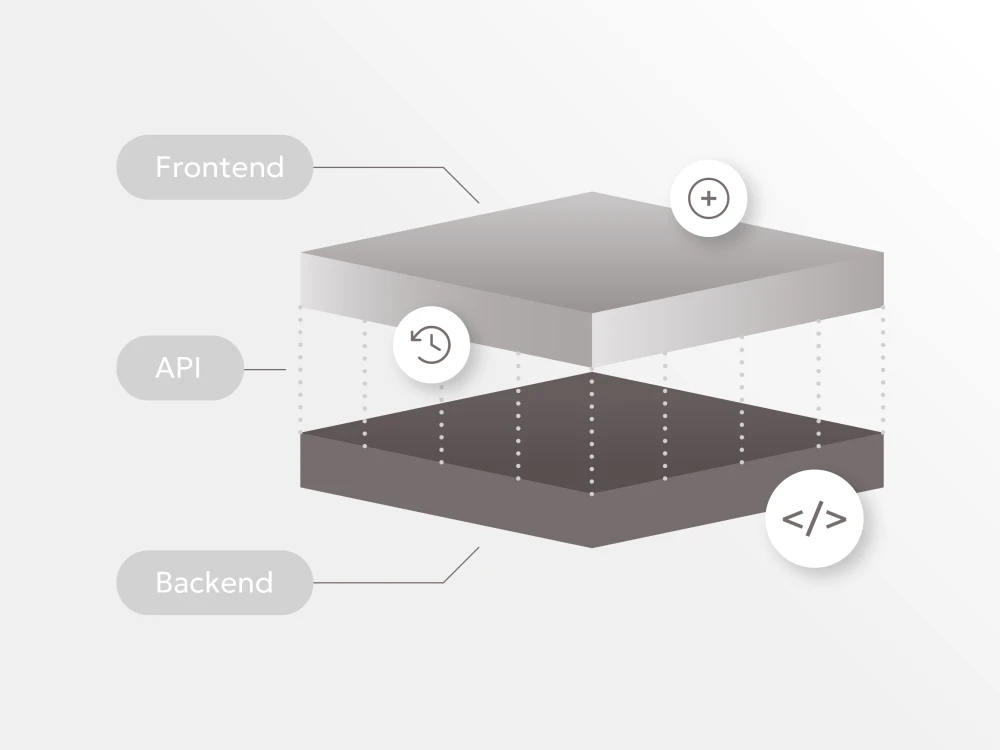
A headless CMS is a content management system that separates content creation from content presentation.
Instead of storing content and publishing it directly to a website page (as a traditional CMS does), a headless CMS stores content in a structured format and delivers it through an API. That content can then be displayed anywhere — on a website, mobile app, digital signage, email platform or future digital experience.
In simple terms:
- A traditional CMS manages content and how it appears on a website.
- A headless CMS manages content only, leaving presentation to your development team.
This approach is especially useful for organizations that need content to move quickly across multiple channels without being locked into one website design or delivery method.
If you’re new to the concept, our overview of what is a headless CMS breaks down the fundamentals in more detail.
A common reason organizations explore headless architecture is frustration with the limitations of traditional CMS platforms. Traditional systems work well for website-first publishing, but they can become restrictive when your content needs to support multiple products and platforms.
Here’s a high-level comparison illustrating the differences between a traditional CMS and headeless CMS:
| Feature | Traditional CMS | Headless CMS |
|---|---|---|
| Primary purpose | Website publishing | Multichannel content delivery |
| Built-in templates | Yes | No |
| Content delivered to apps and platforms | Limited | Strong |
| Editorial preview | Usually built in | Often requires custom setup |
| Developer flexibility | Moderate | High |
| Best for | Single website experiences | Omnichannel digital experiences |
You can explore additional CMS architecture options to understand how headless compares to decoupled and traditional models.
In many modern environments, teams don’t need to choose strictly between one or the other. Some organizations adopt a hybrid headless CMS, which supports both API-driven delivery and strong editorial tools.

Headless CMS architecture is popular for good reason. It helps organizations modernize their content strategy and support digital growth without rebuilding everything each time a new platform is introduced.
Below are some of the most common benefits.
Flexibility to build any digital experience
One of the biggest advantages of a headless CMS is flexibility.
Because content is not tied to a specific website theme or page template, developers can build any type of front-end experience they want. That means your website, mobile app or digital product can evolve independently of the CMS.
This is particularly valuable for organizations that want to redesign their website, launch new digital products or build custom experiences without migrating content each time.
Better omnichannel content delivery
A headless CMS supports an omnichannel content strategy, meaning the same content can be reused across multiple channels.
For example, one product description might be published across:
- A website product page
- A mobile app interface
- A customer portal
- A newsletter
- A digital kiosk
Instead of duplicating content in multiple systems, teams can manage it once and distribute it everywhere.
This improves efficiency, consistency and speed — especially for brands operating across multiple markets or business units.
Faster front-end innovation and iteration
In traditional CMS platforms, design changes and content structure updates often require working inside the CMS framework. That can slow teams down.
With a headless CMS, the front end is separate. This makes it easier to:
- Improve user experience without disrupting content workflows.
- Test new layouts or digital features.
- Build custom components aligned to your product strategy.
- Launch microsites and campaigns quickly.
For organizations that iterate frequently, this can be a major advantage.
Scalability for growing organizations
Many organizations adopt a headless CMS when their digital presence grows beyond a single website.
Headless architecture is well suited for:
- Multisite publishing
- Multi-brand organizations
- International content strategies
- High-traffic digital properties
- Rapid expansion into new channels
Because content is delivered through APIs, it’s easier to scale distribution while keeping content structured and manageable behind the scenes.
Stronger security through separation
Because a headless CMS does not directly power the front-end experience, it can reduce exposure to certain common security risks.
When content delivery is handled through APIs and front-end experiences are hosted separately, organizations have more control over how content is accessed and displayed.
This separation does not eliminate security needs, but it can support a cleaner architecture and reduce reliance on tightly coupled systems.
Future-proof content architecture
A major appeal of headless CMS architecture is long-term adaptability.
Digital channels change quickly. New devices, platforms and content formats appear every year. A headless CMS helps organizations build a content foundation that can support whatever comes next without needing to replace the entire CMS.
This is one reason headless CMS solutions are often associated with “future-proofing” — not because they eliminate change, but because they make change easier to manage.
Explore how these headless CMS features and capabilities are implemented in Brightspot’s flexible architecture.
Headless architecture is powerful, but it comes with trade-offs. Many teams underestimate the effort required to implement headless successfully — especially if they expect it to function like a traditional CMS.
Here are the most common challenges.
More work up front
A headless CMS typically requires more planning and development effort at the beginning of a project.
Unlike a traditional CMS, you usually will not have pre-built page templates or default themes ready to use. Instead, your team must design and build the presentation layer separately.
For some organizations, this investment is worth it. For others — especially those with simpler requirements — it can slow down launch timelines.
Greater dependence on developers
A headless CMS often increases reliance on development resources.
Content editors can still manage content, but many things that come “out of the box” in traditional systems may require custom development, such as:
- Front-end components
- Layout tools
- Page-building interfaces
- Workflow automation
- Publishing previews
This can be a challenge for organizations that want marketing teams to operate independently or teams without dedicated engineering support.
Preview and page editing can be more difficult
One of the most common complaints about headless CMS implementations is preview.
In traditional CMS platforms, editors can often see exactly how a page will look before publishing. In headless systems, preview experiences are possible, but they usually require custom configuration.
This can lead to editorial friction if preview tools are not prioritized early in the project.
For teams that publish frequently or need fast approvals, preview and page-building capabilities can become a deciding factor.
More tools to integrate and maintain
Many headless CMS implementations rely on multiple supporting platforms to deliver a full digital experience.
For example, organizations may need separate tools for:
- Search
- Personalization
- Digital asset management (DAM)
- Analytics
- E-commerce
- Marketing automation
This is not always a negative — some teams prefer a best-of-breed ecosystem — but it does add complexity.
The more tools involved, the more important governance, support and system ownership become.
Total cost can increase over time
A headless CMS can reduce limitations, but it can also increase cost depending on how it is implemented.
Some organizations assume headless means “simpler,” but in reality the overall system may involve:
- CMS licensing
- Hosting infrastructure
- Custom front-end development
- Ongoing maintenance
- Integration work across multiple tools
The cost is not inherently higher, but the budget model often shifts from CMS configuration to ongoing development and optimization.

A headless CMS is a strong fit when content must power multiple experiences and when flexibility is a strategic priority.
A headless CMS is often a good choice if:
- You publish content across multiple channels (web, app, portal and more)
- You manage multiple sites or brands
- Your front-end experience needs to evolve frequently
- You want to use modern frameworks and custom user experiences
- You need to scale content globally across regions and teams
- You want content structured for reuse and personalization
In these environments, headless CMS architecture supports long-term growth and makes content more adaptable.

| Team profile | Recommended architecture | Why |
| Developer-led team, multiple channels | Headless | Maximum flexibility |
| Marketing-led team, single website | Traditional | Lower friction |
| Mixed technical/editorial team | Hybrid headless | Best of both |
| Enterprise with global operations | Headless or hybrid | Scalability + governance |
| Startup with limited dev resources | Traditional or SaaS headless | Speed to launch |
Headless CMS platforms are not always the best solution — especially for organizations that prioritize simplicity and speed over customization.
A headless CMS may not be the best fit if:
- You are launching a basic website or small content project
- Your team has limited developer availability
- Your organization depends heavily on visual page-building tools
- You need a highly intuitive WYSIWYG experience for editors
- You want to launch quickly with minimal technical investment
In these cases, a traditional CMS — or a more hybrid approach — may provide better value and faster results.

Many organizations want the flexibility of headless architecture without sacrificing the usability of a traditional CMS.
That is where a hybrid-headless CMS comes in.
Hybrid platforms combine:
- API-first content delivery (headless capabilities)
- Visual editing tools and workflows (traditional CMS strengths)
- Support for multiple sites, templates and channels
For organizations with both technical and editorial teams, hybrid headless CMS architecture can reduce friction and provide more flexibility without creating unnecessary complexity.
This approach is especially useful when:
- Marketing teams need strong content tools and preview
- Development teams want full control over front-end experiences
- The organization needs both website publishing and omnichannel delivery
Final thoughts: weighing the pros and cons of a headless CMS
A headless CMS can be an excellent choice for organizations building modern digital experiences. It supports flexibility, scalability and omnichannel publishing in a way traditional systems often cannot.
But headless CMS architecture is not automatically better — it depends on your team structure, digital roadmap and publishing needs.
A headless CMS is often the right choice when:
- Your organization is growing
- Content must support multiple platforms
- You want freedom to build custom experiences
It may not be the right fit when:
- Speed and simplicity are the priority
- Developer resources are limited
- Editorial teams need out-of-the-box visual tools
The best CMS architecture is the one that supports your goals today while staying flexible enough to support what comes next.
Brightspot is built as a hybrid headless CMS, offering both API-first content delivery and a native visual editing experience. This makes it particularly well-suited for media and publishing organizations that need developer flexibility without sacrificing editorial usability.


A headless CMS is a content management system that stores content in one place and delivers it through APIs so it can be displayed on any platform — websites, apps or other digital experiences.
Because headless CMS architecture is a subset of decoupled CMS, it shares almost all of the benefits. However, without a designated front end, a headless CMS provides the greatest flexibility to publish content on different platforms. Also, unlike decoupled, headless allows you to publish dynamic content to any device connected via IoT.
Of all three CMS architectures, headless CMS offers the most control regarding how and where your content appears. This architectural approach enables seamless integration with emerging technologies and channels, from mobile apps to smart devices, digital signage and even virtual reality platforms. The API-first nature of headless CMS means content can be structured once and delivered anywhere, making it particularly valuable for organizations managing complex digital ecosystems or planning for future technological advances.
Furthermore, the separation between content management and presentation layers allows development teams to work independently and efficiently, implementing updates and new features without disrupting content operations.
Common headless CMS disadvantages include higher setup effort, greater dependence on developers, more complex preview workflows and the need to integrate additional tools to support a full digital experience.
Headless CMS platforms typically do not come with a user interface, therefore seeing an accurate live preview can prove more difficult than decoupled, which can be particularly challenging for content creators and marketing teams who need to visualize their work before publication. The learning curve can be steeper for non-technical users, as they may need to understand concepts like Markdown or HTML for content formatting.
Additionally, the need for multiple technologies and integrations can create maintenance challenges and require more specialized expertise. For these reasons, headless platforms are best suited for companies with a robust team of developers who prefer to use their favorite frameworks and tools, and who have the technical resources to handle the increased complexity of the implementation and ongoing management.
A traditional CMS manages both content and the website presentation layer. A headless CMS manages only the content and delivers it to the front end through APIs, allowing content to be reused across multiple platforms.
A headless CMS can support excellent SEO, but results depend on how the front end is built. SEO performance is largely driven by site speed, metadata management and structured content — all of which can be handled well in headless environments when implemented correctly.
What are the differences between headless CMS and decoupled CMS?
An easy way to understand the difference between headless CMS versus decoupled CMS architecture is to think of decoupled as proactive and headless CMS as reactive. Decoupled architecture prepares the content on the back end and then can proactively deliver and present formatted content to various channels. Headless CMS, on the other hand, is a content-only data source and has no functionality within the CMS to present content to an end user on it’s own. Content is created and managed, but it just sits there, available and waiting to be called upon by an API and delivered to applications and systems.
This means that a headless CMS implementation is “API only, UI anything”; it can push content to any device or channel with internet access. It can publish the same content to a website, an app, a wearable device or any device connected via Internet of Things (IoT) because the content isn’t bound by a predetermined user interface.
Of course, “headless” doesn’t stay headless assuming, that is, that you want to actually publish the content you create and manage. Something must serve as the “head” for content presentation– but it’s simply not attached, by default.
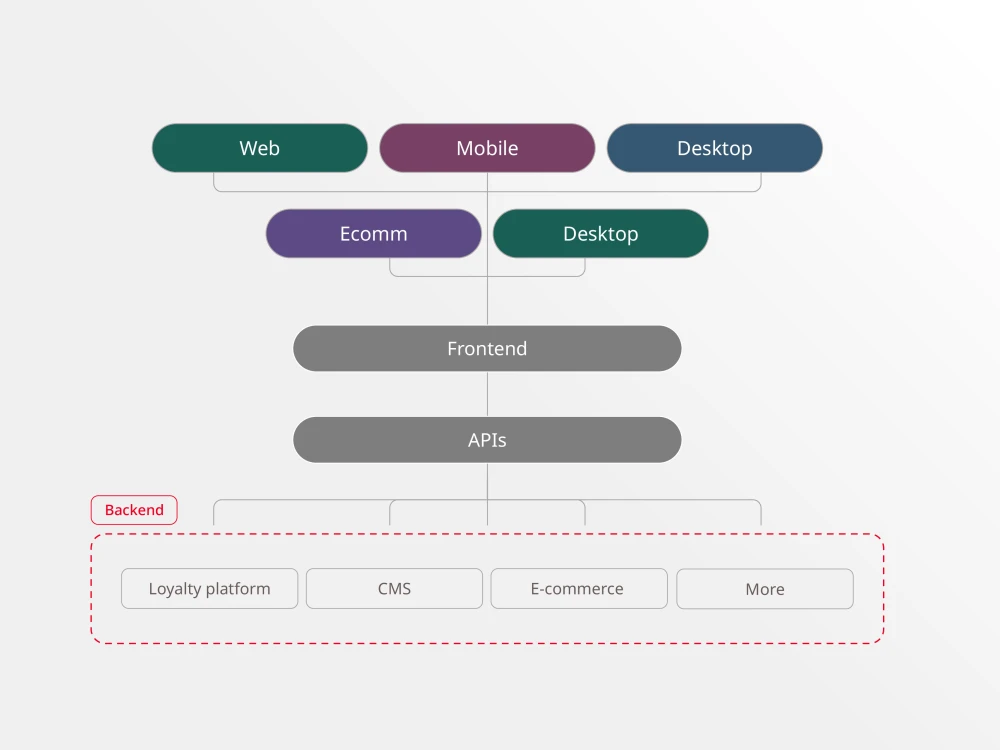
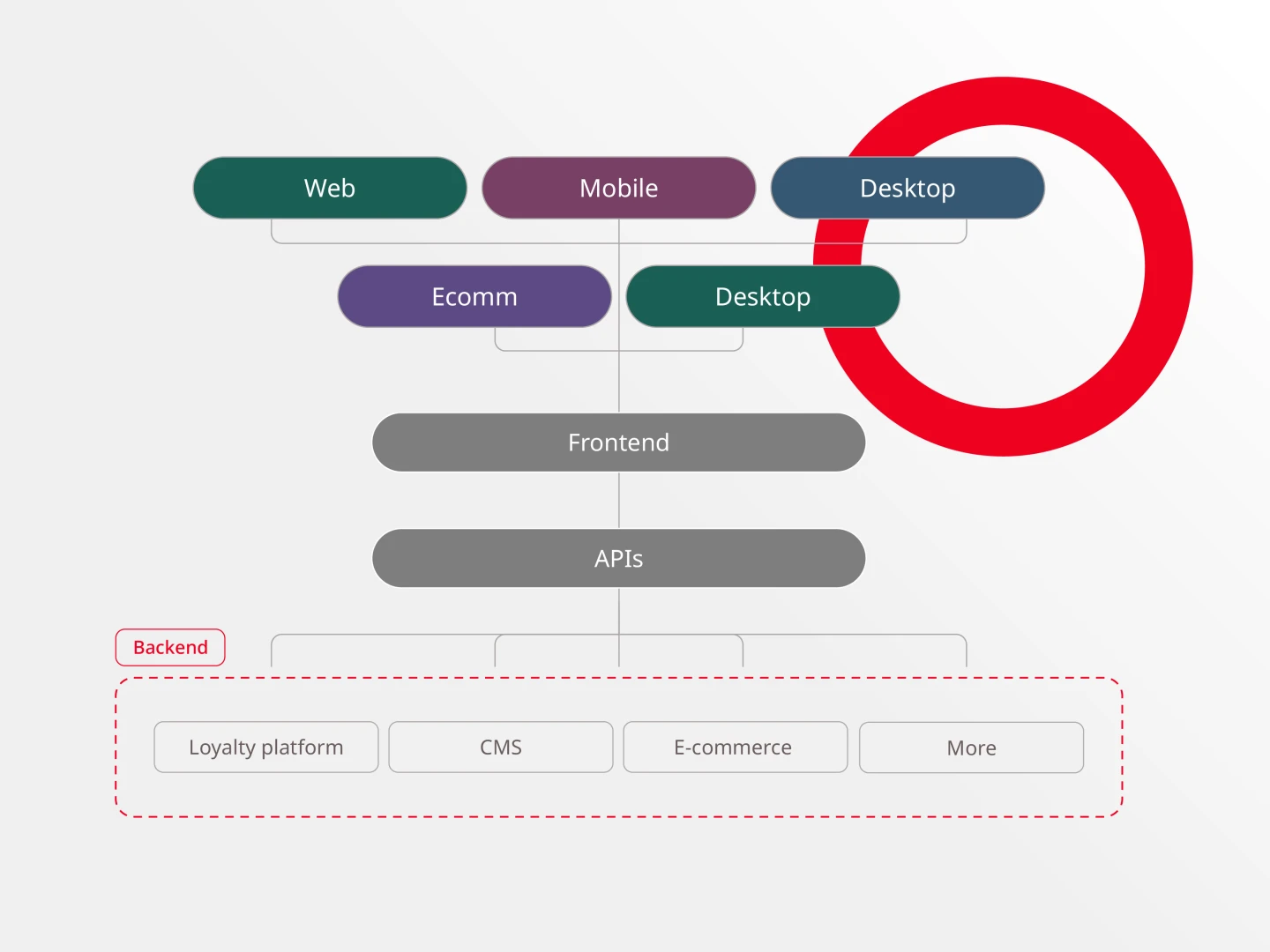
From a technical standpoint, a headless CMS is comprised of:
- A database where content and digital assets are stored (back end);
- A content management back end where content is created (back end);
- An API that connects the content management back end to any device or channel;
- The ability to connect to any publishing front end, allowing organizations to have the front-end technology of their choosing.
Some traditional CMS platforms will claim to be headless, but they became headless through acquisitions and the cobbling together of existing solutions. Be wary, because these solutions aren’t truly headless, and often lack a friendly way of publishing to different channels, such as phones and tablets. In some cases, users can end up multiplying their workload by creating distinct versions of every piece of content for each channel.
What are the pros and cons of coupled vs. decoupled vs. headless CMS architecture?
Each type of CMS architecture has its pros and cons and is more appropriate in specific environments than others. There is no one superior approach and the architecture that will work best for you depends on the needs of your business. Here is our breakdown of the pros and cons of the three types of CMS architectures.
With a headless CMS, you can publish your content to multiple platforms and devices quickly, making immediate delivery choices depending on the brand experience required. The ability to produce content and make front-end changes simultaneously saves you time and money — which can accelerate projects by weeks or even months.
Your content teams can work faster, freed from time spent formatting content for different platforms and devices. Your developers can make rapid enhancements and updates, improving productivity and allowing for more effective use of stored data without risk of instability or performance issues. Your users will have a smoother and more interactive experience due to boosted load speeds and streamlined connectivity.
Here are five leading headless CMS vendors:
Brightspot: A flexible enterprise-grade CMS that uniquely offers traditional, decoupled, headless or hybrid CMS capabilities all in one platform.
- Brightspot’s differentiation factor: Unlike other vendors that became headless through acquisitions, Brightspot is natively designed to work in any architecture mode, providing true flexibility while maintaining an intuitive editorial experience.
Contentful: An API-first headless CMS platform focused on enterprise-level content management with robust APIs and developer tools.
- Brightspot’s differentiation factor: While Contentful focuses purely on headless architecture, Brightspot offers the same API capabilities plus the flexibility to switch between different CMS approaches as business needs evolve.
Strapi: An open-source headless CMS that gives developers complete control over customization and content management.
- Brightspot’s differentiation factor: Unlike Strapi’s developer-centric approach, Brightspot balances technical flexibility with publisher-friendly features and enterprise-grade support.
Sanity: A highly customizable headless CMS platform known for real-time collaboration and structured content.
- Brightspot’s differentiation factor: : Where Sanity emphasizes technical customization, Brightspot provides both advanced development capabilities and an intuitive WYSIWYG editor that makes content creation easier for non-technical users.
Storyblok: A headless CMS with a visual editor designed for both developers and marketers.
- Brightspot’s differentiation factor: : While Storyblok offers visual editing, Brightspot goes further by providing a complete suite of publishing tools, multisite capabilities and the flexibility to operate in different CMS modes while maintaining enterprise-grade security and scalability.
No, a headless CMS is not just an API. While APIs are a crucial component for delivering content, a headless CMS is a complete content management system that includes:
- A content repository/database for storing and organizing content
- A back-end content management interface for creating and editing content
- Administrative tools and workflows
- User management capabilities
- Content modeling and structuring tools
- APIs (REST or GraphQL) that enable content delivery to various platforms
The APIs serve as the delivery mechanism, but they are just one part of the larger headless CMS architecture that enables content creation, management and distribution.
| Feature | Headless CMS | Traditional CMS | Hybrid CMS |
| Front-end flexibility | Full (any framework) | Limited | Partial |
| Developer dependency | High | Low | Moderate |
| Editorial preview | Requires custom build | Native | Native |
| Multi-channel delivery | Native | Plugin-dependent | Native |
| Setup time | Longer | Faster | Moderate |
Advantages by CMS type
| CMS type | Key advantages |
|---|---|
| Headless CMS |
|
| Traditional CMS |
|
| Decoupled CMS |
|
| Hybrid CMS |
|
Disadvantages by CMS type
| CMS type | Key disadvantages |
|---|---|
| Headless CMS |
|
| Traditional CMS |
|
| Decoupled CMS |
|
| Hybrid CMS |
|
Headless offers the most control over how and where your content appears, but requires additional technologies to serve as the “head” due to its lack of content presentation functionality, OOTB templates, or themes.
Headless CMS platforms typically do not come with a user interface, which can make it difficult to see an accurate live preview. Therefore, headless platforms are best suited for companies with a skilled team of developers who prefer to use their favorite frameworks and tools.
- Fast content delivery
- Provides complete control over how and where your content appears
- Secure third-party integrations
- Allows developers to use their favorite tools and frameworks
- Future-proof (integrates easily with new technology and innovations)
- No built-in presentation functionality
- Difficult to see a live preview without significant development assistance
- Reliant on additional technologies for its “head
Decoupling your CMS provides numerous benefits, such as faster and more flexible content delivery, resiliency against changes in the user interface, rapid design iterations, enhanced security, fewer dependencies for publishers and developers, simpler deployment and easy third-party integrations.
While a decoupled CMS offers advantages, it is more complex than traditional CMS and requires extra development work compared to headless implementations, especially in building the front end.
- Fast and flexible content delivery with a specified delivery environment
- Rapid design iterations and simpler deployments
- Easy and secure third-party integrations
- Fewer dependencies on IT
- The best of both worlds in a CMS (structured BE & flexible FE)
- Future-proof (integrates easily with new technology and innovations)
- More complex than traditional to configure and deploy
- Front-end development work required for design
However, the traditional CMS architecture falls short when it comes to more complex websites. It constrains the editors’ ability to publish various content types, such as video, audio and advanced imagery, and restricts where that content can appear. The tight coupling between the front and back ends of the system also limits the ability of developers to customize the programming framework, slowing down the process and making it less agile. As a result, more maintenance and enhancements are required, which translates to additional time and cost.
- Simple; ideal for text-based content
- Built-in themes and templates
- Customize your front end
- Content types and delivery channels are limited
- Limited programming framework
- More time and money required for customization, maintenance and enhancements



Want to learn more? Schedule a demo here to learn more about the options available and which is best for your company.